 |
| A sphere roll without slipping in a bowl. I made this with Matlab. Code is pasted below. |
Mar 23, 2013
Simulation on rolling without slipping
Practicing Python code. First example is written in Matlab. Second one I wrote it in Python.

Mar 1, 2013
Space shuttle Endeavour in California science center


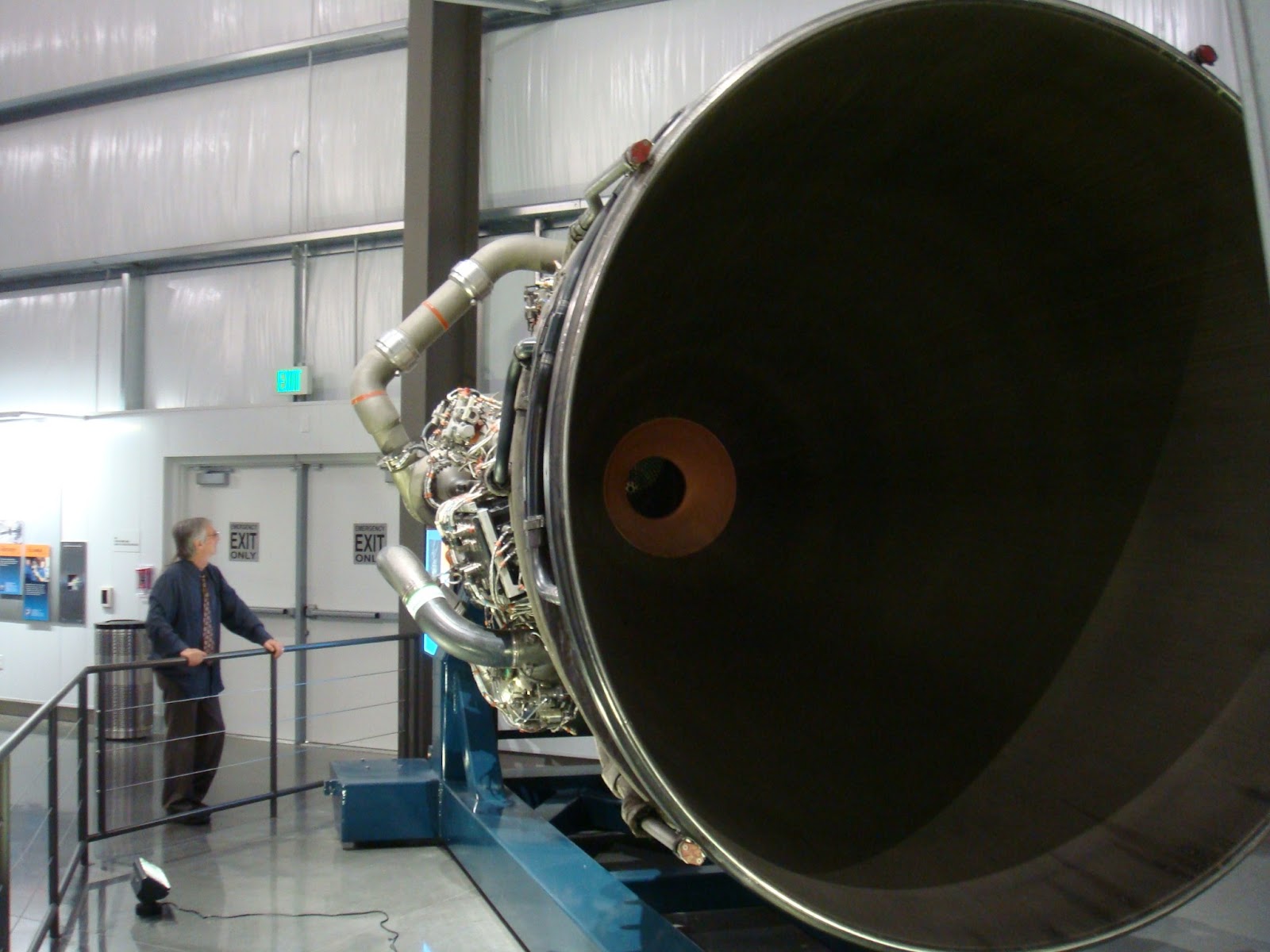 |
| One of the thrusters |


 |
| Ecosystem in California science center |
 |
| Jelly fish |
 |
| IR camera |
 |
| real scale(?) F20 fighter model display |
 |
| heat shield of a spaceship showing the high temperature burn (~3000 degree C ?) generated from ship re-entering the Earth atmosphere |


Feb 25, 2013
tracking of my python anaconda conda and packages setup
2016/Jan 22
current conda version and packages
C:\Documents and Settings\The One>conda list
# packages in environment at C:\Documents and Settings\The One\Anaconda:
#
_license 1.1 py27_0
anaconda 1.8.0 np17py27_0
apptools 4.2.0 py27_0
astropy 0.2.5 np17py27_0
atom 0.3.4 py27_0
beautiful-soup 4.3.1 py27_0
beautifulsoup4 4.3.1
binstar 0.3.1 py27_1
biopython 1.62 np17py27_0
bitarray 0.8.1 py27_0
blaze 0.3 np17py27_0
bokeh 0.2 np17py27_1
boto 2.15.0 py27_0
casuarius 1.1 py27_0
chaco 4.3.0 np17py27_1
colorama 0.2.7 py27_0
conda 3.19.0 py27_0 defaults
conda-env 2.4.5 py27_0 defaults
configobj 4.7.2 py27_0
cubes 0.10.2 py27_3
cython 0.19.2 py27_0
dateutil 2.1 py27_2
distribute 0.6.45 py27_0
docutils 0.11 py27_0
dynd-python 0.5.0 np17py27_0
enable 4.3.0 np17py27_0
enaml 0.8.3 py27_0
envisage 4.3.0 py27_0
flask 0.10.1 py27_1
gevent 0.13.8 py27_0
gevent-websocket 0.3.6 py27_2
gevent-zeromq 0.2.2
gevent_zeromq 0.2.5 py27_2
greenlet 0.4.1 py27_0
grin 1.2.1 py27_2
h5py 2.2.0 np17py27_0
imaging 1.1.7 py27_2
ipython 1.1.0 py27_0
ipython-notebook 1.1.0 py27_0
ipython-qtconsole 1.1.0 py27_0
itsdangerous 0.23 py27_0
jinja2 2.7.1 py27_0
keyring 3.2 py27_0
launcher 0.1.2 py27_0
libpython 1.0 py27_0
llvmmath 0.1.1 np17py27_2
llvmpy 0.12.0 py27_0
lxml 3.2.3 py27_0
markupsafe 0.18 py27_0
matplotlib 1.3.1 np17py27_0
mayavi 4.3.0 np17py27_2
mdp 3.3 np17py27_0
menuinst 1.3.2 py27_0 defaults
meta 0.4.2.dev py27_0
mingw 4.7 1
msvc_runtime 1.0.1 vc9_0 [vc9] anaconda
networkx 1.8.1 py27_0
nltk 2.0.4 np17py27_0
nose 1.3.0 py27_1
numba 0.11.0 np17py27_0
numexpr 2.2.2 np17py27_0
numpy 1.10.1 py27_0 defaults
openpyxl 1.6.2 py27_0
pandas 0.12.0 np17py27_0
patsy 0.2.1 np17py27_0
pep8 1.4.6 py27_0
pil 1.1.7
pip 8.0.1 py27_0 defaults
ply 3.4 py27_0
psutil 1.1.2 py27_0
py 1.4.17 py27_0
pycosat 0.6.1 py27_0 defaults
pycparser 2.9.1 py27_0
pycrypto 2.6.1 py27_0
pyface 4.3.0 py27_0
pyflakes 0.7.3 py27_0
pygments 2.0.2 py27_0 defaults
pykit 0.1.0 np17py27_0
pyopengl 3.1.1a1 np110py27_0 defaults
pyparsing 1.5.6 py27_0
pyreadline 2.0.dev py27_0
pysal 1.6.0 np17py27_1
pyside 1.2.1 py27_0
pytables 3.0.0 np17py27_1
pytest 2.4.2 py27_0
python 2.7.5 2
python-dateutil 1.5
pytz 2013b py27_0
pywin32 218.4 py27_0
pyyaml 3.11 py27_2 defaults
pyzmq 2.2.0.1 py27_0
requests 2.9.1 py27_0 defaults
rope 0.9.4 py27_0
scikit-image 0.9.3 np17py27_0
scikit-learn 0.14.1 np17py27_0
scipy 0.13.0 np17py27_0
setuptools 19.4 py27_0 defaults
six 1.4.1 py27_0
sphinx 1.1.3 py27_4
spyder 2.2.5 py27_0
spyder-app 2.2.5 py27_0
sqlalchemy 0.8.3 py27_0
statsmodels 0.5.0 np17py27_0
sympy 0.7.3 py27_0
tables 3.0.0
tornado 3.1.1 py27_0
traits 4.3.0 py27_0
traitsui 4.3.0 py27_0
vtk 5.10.1 py27_0
werkzeug 0.9.4 py27_0
wheel 0.26.0 py27_1 defaults
xlrd 0.9.2 py27_0
xlwt 0.7.5 py27_0
C:\Documents and Settings\The One>
this setting can run GS Simulation software as is currently(v1,developing v2).
----
2015/July/9
嘗試在windows32 xp上安裝pyopenGL到anaconda
用conda安裝一個virtual environment
conda create -n tonytest -c https://conda.anaconda.org/menpo pyopengl pyopengl-accelerate menpo-pyvrml97 simpleparse numpy pydispatcher pillow
包含所有此網頁上所建議的套件除了openglcontext之外
因為anaconda上面找不到win32的openglcontext
所以如果用上面方法加上openglcontext會無法建立environment
然後再用pip install的方式來裝openglcontext
pip install PyDispatcher PyVRML97 OpenGLContext
這樣是可以安裝成功
沒有錯誤訊息
不過在跑nehe第一個example的時候
會出錯
找不到glutInit
還在找原因當中
按照以下的方法把glut32.dll放到opengl/dlls裡
http://cim.mcgill.ca/~fmannan/comp557/Python%20and%20PyOpenGL%20Installation.html
解決了第一步glutinit undefined問題
並且可以跑此sample
但有第二個問題
glCreateShader, glCreateShaderObjectARB undefined
----
2013/2/25
Python 3.3 + Matplotlib 1.2.0 + numpy 1.7.0 + mpl_toolkits
current conda version and packages
C:\Documents and Settings\The One>conda list
# packages in environment at C:\Documents and Settings\The One\Anaconda:
#
_license 1.1 py27_0
anaconda 1.8.0 np17py27_0
apptools 4.2.0 py27_0
astropy 0.2.5 np17py27_0
atom 0.3.4 py27_0
beautiful-soup 4.3.1 py27_0
beautifulsoup4 4.3.1
binstar 0.3.1 py27_1
biopython 1.62 np17py27_0
bitarray 0.8.1 py27_0
blaze 0.3 np17py27_0
bokeh 0.2 np17py27_1
boto 2.15.0 py27_0
casuarius 1.1 py27_0
chaco 4.3.0 np17py27_1
colorama 0.2.7 py27_0
conda 3.19.0 py27_0 defaults
conda-env 2.4.5 py27_0 defaults
configobj 4.7.2 py27_0
cubes 0.10.2 py27_3
cython 0.19.2 py27_0
dateutil 2.1 py27_2
distribute 0.6.45 py27_0
docutils 0.11 py27_0
dynd-python 0.5.0 np17py27_0
enable 4.3.0 np17py27_0
enaml 0.8.3 py27_0
envisage 4.3.0 py27_0
flask 0.10.1 py27_1
gevent 0.13.8 py27_0
gevent-websocket 0.3.6 py27_2
gevent-zeromq 0.2.2
gevent_zeromq 0.2.5 py27_2
greenlet 0.4.1 py27_0
grin 1.2.1 py27_2
h5py 2.2.0 np17py27_0
imaging 1.1.7 py27_2
ipython 1.1.0 py27_0
ipython-notebook 1.1.0 py27_0
ipython-qtconsole 1.1.0 py27_0
itsdangerous 0.23 py27_0
jinja2 2.7.1 py27_0
keyring 3.2 py27_0
launcher 0.1.2 py27_0
libpython 1.0 py27_0
llvmmath 0.1.1 np17py27_2
llvmpy 0.12.0 py27_0
lxml 3.2.3 py27_0
markupsafe 0.18 py27_0
matplotlib 1.3.1 np17py27_0
mayavi 4.3.0 np17py27_2
mdp 3.3 np17py27_0
menuinst 1.3.2 py27_0 defaults
meta 0.4.2.dev py27_0
mingw 4.7 1
msvc_runtime 1.0.1 vc9_0 [vc9] anaconda
networkx 1.8.1 py27_0
nltk 2.0.4 np17py27_0
nose 1.3.0 py27_1
numba 0.11.0 np17py27_0
numexpr 2.2.2 np17py27_0
numpy 1.10.1 py27_0 defaults
openpyxl 1.6.2 py27_0
pandas 0.12.0 np17py27_0
patsy 0.2.1 np17py27_0
pep8 1.4.6 py27_0
pil 1.1.7
pip 8.0.1 py27_0 defaults
ply 3.4 py27_0
psutil 1.1.2 py27_0
py 1.4.17 py27_0
pycosat 0.6.1 py27_0 defaults
pycparser 2.9.1 py27_0
pycrypto 2.6.1 py27_0
pyface 4.3.0 py27_0
pyflakes 0.7.3 py27_0
pygments 2.0.2 py27_0 defaults
pykit 0.1.0 np17py27_0
pyopengl 3.1.1a1 np110py27_0 defaults
pyparsing 1.5.6 py27_0
pyreadline 2.0.dev py27_0
pysal 1.6.0 np17py27_1
pyside 1.2.1 py27_0
pytables 3.0.0 np17py27_1
pytest 2.4.2 py27_0
python 2.7.5 2
python-dateutil 1.5
pytz 2013b py27_0
pywin32 218.4 py27_0
pyyaml 3.11 py27_2 defaults
pyzmq 2.2.0.1 py27_0
requests 2.9.1 py27_0 defaults
rope 0.9.4 py27_0
scikit-image 0.9.3 np17py27_0
scikit-learn 0.14.1 np17py27_0
scipy 0.13.0 np17py27_0
setuptools 19.4 py27_0 defaults
six 1.4.1 py27_0
sphinx 1.1.3 py27_4
spyder 2.2.5 py27_0
spyder-app 2.2.5 py27_0
sqlalchemy 0.8.3 py27_0
statsmodels 0.5.0 np17py27_0
sympy 0.7.3 py27_0
tables 3.0.0
tornado 3.1.1 py27_0
traits 4.3.0 py27_0
traitsui 4.3.0 py27_0
vtk 5.10.1 py27_0
werkzeug 0.9.4 py27_0
wheel 0.26.0 py27_1 defaults
xlrd 0.9.2 py27_0
xlwt 0.7.5 py27_0
C:\Documents and Settings\The One>
this setting can run GS Simulation software as is currently(v1,developing v2).
----
2015/July/9
嘗試在windows32 xp上安裝pyopenGL到anaconda
用conda安裝一個virtual environment
conda create -n tonytest -c https://conda.anaconda.org/menpo pyopengl pyopengl-accelerate menpo-pyvrml97 simpleparse numpy pydispatcher pillow
包含所有此網頁上所建議的套件除了openglcontext之外
因為anaconda上面找不到win32的openglcontext
所以如果用上面方法加上openglcontext會無法建立environment
然後再用pip install的方式來裝openglcontext
pip install PyDispatcher PyVRML97 OpenGLContext
這樣是可以安裝成功
沒有錯誤訊息
不過在跑nehe第一個example的時候
會出錯
找不到glutInit
還在找原因當中
按照以下的方法把glut32.dll放到opengl/dlls裡
http://cim.mcgill.ca/~fmannan/comp557/Python%20and%20PyOpenGL%20Installation.html
解決了第一步glutinit undefined問題
並且可以跑此sample
但有第二個問題
glCreateShader, glCreateShaderObjectARB undefined
----
2013/2/25
Python 3.3 + Matplotlib 1.2.0 + numpy 1.7.0 + mpl_toolkits
FFmpeg needs to be installed on computer for creating animation mp4 films.
----
Feb 8, 2013
RB9 RHYTHM OF THE FACTORY
This artfully and music little film lets you peek into Red Bull top-secret factory and the production of their new 2013 formula one car.
Dec 13, 2012
Scientific Workplace and it's 'Style Editor'
Last update: 2/25/2013
More findings
Style Editor enables ones to add styles to your TEX typesetting document by simply bushing buttons, much like what you did in MS Words. You highlight your text or paragraphs and push tool buttons ( can be multiple) on your tool bar to add decorations. So you don't need to type TEX commands every time you want a different style. I believe Style Editor serves this purpose by creating another file called *.sty file and by inserting flags in the original tex files. When SWP compiles the .tex file and reads a flag it will detour to the .sty file where the real formats are saved and apply them. Not super sure about this but we don't really need to know anyway. (If you want to know more - > http://www.tug.org/tugboat/tb15-3/tb44stenerson.pdf)
More findings
Style Editor enables ones to add styles to your TEX typesetting document by simply bushing buttons, much like what you did in MS Words. You highlight your text or paragraphs and push tool buttons ( can be multiple) on your tool bar to add decorations. So you don't need to type TEX commands every time you want a different style. I believe Style Editor serves this purpose by creating another file called *.sty file and by inserting flags in the original tex files. When SWP compiles the .tex file and reads a flag it will detour to the .sty file where the real formats are saved and apply them. Not super sure about this but we don't really need to know anyway. (If you want to know more - > http://www.tug.org/tugboat/tb15-3/tb44stenerson.pdf)
Dec 7, 2012

Nov 28, 2012
How hard is it to drive a F1 car?
From an onboard camera, this shows the start of a F1 race from the driver's aspect. You can sort of feel the subtle reaction of the car when the driver works on tires before the start of the race. Try to feel the surrounding environment passing by and you will get a scene of how fast the car is flying! Also from this film you can kind of feel the G force from acceleration and corning!
巴西站Brazil https://www.youtube.com/watch?v=uMKwpQGXQ9A
Subscribe to:
Posts (Atom)